Being in Information Security Field You have to wear multiple hats so I am


Most of the time we usually regret for writing a mail without subject line. Now not any more. A tip for outlook user like gmail now your outlook is also going to prompt..
Enclosed the steps to enable this feature
1. Open your outlook.
2. Press Alt+F11. This opens the Visual Basic editor and then Press Ctrl+R which in turn open Project-Project 1 (left side)
3. On the Left Pane, one can see "Microsoft Outlook Objects" or "Project1", expand this. Now one can see the "ThisOutLookSession".
4. Double click on "ThisOutLookSession". It will open up a code pane.
5. Copy and Paste the following code in the right pane. (Code Pane) and save it.
Private Sub Application_ItemSend(ByVal Item As Object, Cancel As Boolean)
Dim strSubject As String
strSubject = Item.Subject
If Len(Trim(strSubject)) = 0 Then
Prompt$ = "Subject is Empty. Are you sure you want to send the Mail?"
If MsgBox(Prompt$, vbYesNo + vbQuestion + vbMsgBoxSetForeground, "Check for Subject") = vbNo Then
Cancel = True
End If
End If
End Sub
6. Now whenever u try to send a mail without subject, it will raise a pop-up to remind.
Last time, we explained how to view additional information for each process via Task Manager's Processes tab. In Task Manager, you'll notice a process named Svchost.exe. This process doesn't appear as an application in the Applications tab--it only appears in the Process tab, and there can be multiple instances of it on a system.
Svchost.exe is a generic Windows 2000 process that runs services from Dynamic Link Libraries (DLLs). When the system starts, Svchost.exe loads the services listed in this registry key:
HKEY_LOCAL_MACHINE\Software\Microsoft\Windows NT\CurrentVersion
\Svchost
Each entry in this key specifies a service group and is a REG_MULTI_SZ value, which means it can contain multiple string values. These values define service names for services that are members of the group. The service names themselves come from the Svchost registry key:
HKEY_LOCAL_MACHINE\System\CurrentControlSet\Services\Service
The Processes tab doesn't display the individual services that are part of the service group, nor can you add an optional column to view the services. However, you can view the service groups' individual services using the Tlist.exe utility included with the Windows 2000 Resource Kit.
After you install Tlist.exe from the Resource Kit, open a command console and issue the command:
Tlist.exe -s or tasklist /M
Scan the resulting output and look for instances of Svchost.exe. Each Svchost line will include a list of the services running under that instance of the process.
Knowing what processes are running on a system and being able to identify those processes is an important step when troubleshooting system problems or attempting to recover a hung system without rebooting. Once you identify the hung process, you can kill the process from the Task Manager.


Step 1: Decide on Your Level of Trust Assuming that people will do the right thing is easy and tempting. Don’t let yourself take this shortcut. Spell out what is expected and what is prohibited. Decide on the controls youwill use to measure adherence to the good practices that you are about to define. (This applies to programs as well as people.) Specify repercussions that will follow if employeesdo not adhere to practices. Trust different employees in different ways. Those withunprivileged access are in a different category than those with high levels of accessprivilege.
Step 2: Define Appropriate Behavior Whether the topic is email usage, password policies, or keeping company secrets, yoursystem’s users and the people who evaluate them must know what is expected. Your policiesare necessary to support an HR action in the face of inappropriate behavior, or even toprosecute a criminal case in extreme examples.
Step 3: Create a Policy Review Team The members of this team are responsible for drafting new policies and revising existingones.
Step 4: Use the Work of Others The previous section gave a pointer to a set of policies suitable for a large company. A Google.com search turns up literally dozens of sample policies for sale. Amazon has several books. You should investigate these resources and find one that matches your organization’sprofile. This will save you significant amounts of work. Even more important, it will keep you from accidentally omitting vital areas from consideration.
Members of the Policy Review Team
Representative From Duties Management Someone who can enforce the policy. This is often a senior memberof the HR staff. Information Security Department Someone who can provide technical insight and research. User Areas Someone who can view the policies the way a user might view them. Legal Department Possibly part time, but someone who can review policies with respect to applicable laws. For multinational firms, this review is exponentially more complicated. Publications Someone who can make suggestions on communicating the policies to the organization’s members and getting their buy in. Also, a goodwriter is always helpful.
A Sample Security Policy (Password Policy Extracted From Book )
1.0 Overview
Passwords are an important aspect of computer security. They are the front line of protection for user accounts. A poorly chosen password may result in the compromise of Example Corporation’s entire corporate network. As such, all Example Corporation employees (including contractors and vendors with access to Example Corporation systems) are responsible for taking the appropriate steps, as outlined below, to select andsecure their passwords.
2.0 Purpose
The purpose of this policy is to establish a standard for creation of strong passwords, the protection of those passwords, and the frequency of change.
3.0 Scope
The scope of this policy includes all personnel who have or are responsible for an account(or any form of access that supports or requires a password) on any system that resides atany Example Corporation facility, has access to the Example Corporation network, orstores any non-public Example Corporation information.
4.0 Policy
4.1 General
4.2 Guidelines
A. General Password Construction Guidelines Passwords are used for variouspurposes at Example Corporation. Some of the more common uses include: user level accounts, web accounts, email accounts, screen saver protection, voicemail password, and local router logins. Since very few systems have support for one-time tokens (i.e., dynamic passwords which are only used once), everyone should be aware of how to select strong passwords. Poor, weak passwords have the following characteristics:
Strong passwords have the following characteristics:
B. Password Protection Standards Do not use the same password for Example Corporation accounts as for other non-Example Corporation access (e.g., personal ISPaccount, option trading, benefits, etc.). Where possible, don’t use the same password for various Example Corporation access needs. For example, select one password for the Engineering systems and a separate password for IT systems. Also, select a separate password to be used for an NT account and a UNIX account. Do not share Example Corporation passwords with anyone, including administrative assistants or secretaries. All passwords are to be treated as sensitive, Confidential Example Corporation information.
List of don’ts:
Change passwords at least once every six months (except system-level passwords whichmust be changed quarterly). The recommended change interval is every four months. If an account or password is suspected to have been compromised, report the incident to theInformation Security Department and change all passwords. Password cracking or guessing may be performed on a periodic or random basis by theInformation Security Department or its delegates. If a password is guessed or cracked during one of these scans, the user will be required to change it.
C. Application Development Standards Application developers must ensure their programs contain the following security precautions.
Applications:
• Should support authentication of individual users, not groups.
• Should not store passwords in clear text or in any easily reversible form.
• Should provide for some sort of role management, such that one user can take overthe functions of another without having to know the other’s password.
• Should support TACACS+ , RADIUS and/or X.509 with LDAP security retrieval,wherever possible.
D. Use of Passwords and Passphrases for Remote Access Users Access to theExample Corporation Networks via remote access is to be controlled using either a onetimepassword authentication or a public/private key system with a strong passphrase.
E. Passphrases Passphrases are generally used for public/private key authentication. Apublic/private key system defines a mathematical relationship between the public key thatis known by all, and the private key, that is known only to the user. Without the passphraseto “unlock” the private key, the user cannot gain access. Passphrases are not the same as passwords. A passphrase is a longer version of a passwordand is, therefore, more secure. A passphrase is typically composed of multiple words.Because of this, a passphrase is more secure against “dictionary attacks.”A good passphrase is relatively long and contains a combination of upper and lowercaseletters and numeric and punctuation characters. An example of a good passphrase:“The*?#>*@TrafficOnTheBridgeWas*&#!#ThisMorning”All of the rules above that apply to passwords apply to passphrases.
5.0 Enforcement
Any employee found to have violated this policy may be subject to disciplinary action, upto and including termination of employment.
6.0 Definitions
Terms DefinitionsApplication Administration Account Any account that is for the administration of anapplication (e.g., Oracle database administrator,Notes administrator).
7.0 Revision History
Policies commonly apply to less than all sections of the organization. Policies on acquiring commercial software or running a test lab or training department apply only to segments ofthe company, whereas policies such as an Information Sensitivity Policy (deals with keeping confidential company information private) or Password Policies apply across the enterprise.
Example Security Policies Several model security policies are available on the web. A good starting place is RFC 2196, “Site Security Handbook,” which discusses all aspects of security policies, fromcontent development to implementation. Another source of sample policies comes fromSANS. The direct link is www.sans.org/newlook/resources/policies/policies.htm. If thelink breaks, key the title of the page, The SANS Security Policy Project, into the searchthis-site box on the SANS home page.
Effectively Implementing Your Security Policy When you develop policies, you need to balance productivity and security. The goal of all good employees is to get their work done. If you create a rule that the employee thinks is just in the way, that employee will either ignore it or bypass it. Sometimes, you can implement technical controls to make sure that policies are followed (password changeperiods, for example), but other times you cannot. (A rule about never giving your passwordto someone else cannot be enforced by software.) You must make security a part of the corporate culture. This does not have to be done in a punitive way.
Here are two examples. A company whose policy called for password-protected screen savers or locked workstations whenever an employee was not using the PC was enforced by having security staff (uniformed guards on patrol) write “tickets”—they looked like parking tickets—and taping them to the monitor. The tickets reminded the users of the rules. The guards were taught how to Ctl-Alt-Del and pick Lock Workstation, and were instructed to do so whenever issuing a ticket. Another company had guards walk around after the close of business looking for laptop sleft unattended. They took laptops they found and left a “luggage receipt” on the desk saying that the lost luggage could be claimed at the security station. Avoiding Failure One sure way to make a policy fail is to apply it unevenly. If certain people, because of their position or influence, can bypass policies with impunity, the policies will all become unenforceable. You must get management buy-in, even if doing so is painful.
Cisco CallManager server
Complete these steps in order to configure the Cisco CallManager server to automatically synchronize, and stay synchronized, with a Time server.
Note: You cannot use NTP to synchronize between two Cisco CallManagers. The NTP that is installed in Cisco CallManager is a client NTP service and only synchronizes to an NTP server.
1 file(s) copied.(NTP Operations Guide) in the C:\WINNT\..\xntp directory...Right-click on My Computer and select Manage.
Expand the Services and Applications section.
Select Services.
Double-click on the Network Time Protocol service.
Ensure that Start-up Type is set to Automatic.
Configure the C:\WINNT\system32\drivers\etc\ntp.conf file.
This file contains the list of Time Servers that Cisco CallManager becomes synchronized with. You can configure Cisco CallManager to point to specific Time Servers, or you can configure it to receive NTP broadcasts on the local LAN segment from the router (as long as the router is configured to do so).
Sample ntp.conf file that uses static Time Servers:
server patryk.keekar.com
server marc.keekar.com
driftfile %windir%\ntp.drift
Sample ntp.conf file that uses an NTP broadcast router:
broadcastclient
driftfile %windir%\ntp.drift
Go to the Services Control Panel and stop/start the NetworkTimeProtocol service. Allow several minutes for the update to take place.
Note: This procedure only applies to Cisco CallManager.
Complete these steps in order to install the NetworkTimeProtocol service:
Open a command prompt and change to this directory:
C:\>cd C:\Program Files\Cisco\Xntp
Run install.bat:
C:\Program Files\Cisco\Xntp>install.bat
Installing Configuration Files
1 file(s) copied.
Installing Executables
1 file(s) copied.
1 file(s) copied.
1 file(s) copied.
1 file(s) copied.
The NTP service is already installed
Remove it first if you need to re-install a new version
.
The NTP Service is now installed.
Please modify the NTP.CONF file in C:\WINNT appropriately.
.
See readme.txt for more information.
.
After modifying the configuration file, use the services control panel
to make NTP autostart and either reboot or manually start it.
When the system restarts, the NTP service will be running.
For more information on NTP Operations please see the NTPOG.Wri
C:\Program Files\Cisco\Xntp>
Note: This procedure only applies to Cisco CallManager.
Complete these steps in order to synchronize time manually with the Time Server using NTP.
Stop the NetworkTimeProtocol service in the Services Control Panel.
Synchronize the clock by using this commands from a command prompt:
In order to synchronize with a remote Time server:
ntpdate marc.keeker.com
Restart the NetworkTimeProtocol service in the Services Control Panel.
!--- Enable service timestamps datetime!--------------------------END --------------------------
service timestamps debug datetime msec localtime
service timestamps log datetime msec localtime
!
!
!
!--- Hostnames for the MSFCs.
hostname MSFC15 alt hostname MSFC16
!
!
!
!Both MSFCs are in the PST timezone
clock timezone PST -8
!
!--- Both MSFCs will adjust the clock for Daylight Saving Time.
clock summer-time PDT recurring
!
!--- If connectivity to the NTP server is lost, the calendar is used.
!as an authoritative time source
clock calendar-valid
!
no ip finger
ip domain-name corp.com
ip name-server 172.16.55.120
ip name-server 171.16.60.120
!!
!--- Each MSFC uses the IP address of the loopback0 interface as
!--- the source IP for NTP packets.
ntp source Loopback0
!
!--- The MSFCs will update the hardware calendar with the NTP time.
ntp update-calendar
!
!--- Both MSFCs are getting the time from 10.100.100.1.
ntp server patryk.keekar.com
!
end
Configures SNTP to request NTP packets from an NTP server.
Router(config)# sntp server patryk.keekar.com [version number]
Configures SNTP to accept NTP packets from any NTP broadcast server.Router(config)# sntp broadcast client
Enter the sntp server command once for each NTP server. The NTP servers must be configured to respond to the SNTP messages from the router.
If you enter both the sntp server command and the sntp broadcast client command, the router will accept time from a broadcast server but prefer time from a configured server, assuming that the strata are equal. To display information about SNTP, use the show sntp EXEC command.
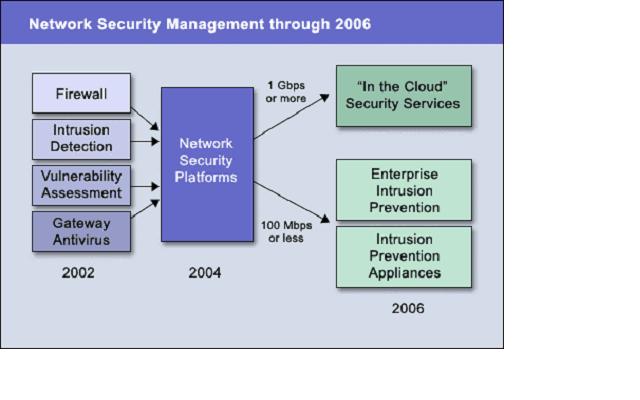
Content-switching and load-balancing vendors will add security functionality to their platforms, which already offer high-speed processing and deep packet inspection for making caching/load balancing type decisions. These vendors see security as a new revenue stream from their installed base, and as a way to avoid the threat of network security platform vendors that are adding switching and load-balancing functions to their platforms. Although content-switching/load-balancing vendors have extensive experience in wire-speed traffic processing, they don't have deep security expertise. This will prompt network performance vendors to acquire network security technology companies that specialize in deep packet processing.
Network security platform market road map
In 2002, firewall vendors such as Check Point Software Technologies, Symantec, and NetScreen took steps toward becoming network security platform vendors. Check Point announced Smart Defense, which integrates intrusion detection capabilities onto Firewall-1. Symantec's Gateway Security product combines firewall, intrusion detection, gateway antivirus, and URL blocking functions into one appliance. NetScreen’s implementation of simple, signature-based filtering and its acquisition of OneSecure were strong moves in the platform direction.
However, these first-generation efforts provide minimal integration between functions, and they generally don’t add vulnerability assessment capabilities. Newer market entrants such as TippingPoint provide tighter integration of the required functions, but in a closed architecture that will require enterprise testing to determine the effectiveness of the individual firewall, intrusion detection, and antivirus functions, as well as integrated capabilities.
Gartner believes products that fully-integrated network security functions that can operate at wire speeds will not affect the firewall and intrusion detection markets until 2H04. After 2H04, intrusion detection vendors that do not offer network security platforms will begin to exit the market through acquisition by network security platform players or loss of market share.
The initial product focus between 2004 and 2006 will be at the enterprise level, with price points in the $25,000 to $75,000 range. If the telecom market recovers from the economic downturn before 2006, mainstream telecom and Internet service providers will begin to offer managed security services that will drive the development of higher-speed, lower-priced offerings and use-based pricing models. Gartner believes that aggressive telecom providers will offer some “in the cloud” services by late 2004. The low-end, small-and-midsize-enterprise-class network security platform will not be a market factor until 2007, when platforms with limited functionality and processing speeds will be available at price points of less than $10,000.
Managing multiple security devices
Most enterprises have deployed numerous firewalls, and many also have deployed one or more intrusion detection products. Network security platforms will be viable enterprise solutions by 2006, and they will transform today’s disparate network security market. Until that occurs, enterprises that have deployed firewalls and intrusion detection systems can use security device management products to gain a preliminary level of integration between network security products. These products support alarm/alert normalization, aggregation, data reduction and a degree of correlation to greatly reduce the false alarm rate and the operational burden of monitoring security devices. Although the loose integration that is provided by these products doesn't support the speed of response necessary to implement intrusion prevention, security management products enable enterprises to extend their investments in security products and provide a management structure for incorporating advanced security products.
Security management price points will have to drop below the six-figures of current offerings to reach the broad market. Outsourcing the monitoring and management of perimeter network security devices is another option for enterprises that are looking to avoid investing in early-stage technology or limited security staffing levels.
Bottom line
Tighter integration and common management across network security controls is a panacea of Internet security. Network security platforms maintain best-of-breed security approaches while supporting improved attack blocking and lowering total cost of ownership.
The probes are searching for systems that have vulnerable versions of LPRng, the "Next Generation" version of the widely used LPR printing utility, as well as the RPC daemon used with Network File System (NFS) services. While a large portion of these attacks were the result of U.S./Chinese cyberskirmishes following the downing of a U.S. spy plane, the subsequent hacking traffic has not died down. Check your software distribution's home page for an updated version of LPRng and RPC, and do so without delay!
Remember that automated probes are looking for TCP/IP listening ports that are associated with known system weaknesses. Make sure that you're running your Linux system with all ports disabled; save the ones that you absolutely need. In a terminal window, switch to superuser status, open /etc/inetd.conf, and comment out ports you're not using (for a single-user system that isn't functioning as a server, likely candidates include anonymous FTP, POP3, Telnet, rlogin, and rcp).
New vulnerability in wu-ftpd
I have recently found a article on net that vulnerability has been confirmed in the wu-ftpd FTP daemon. This vulnerability is remotely exploitable and can be used to execute arbitrary code on the vulnerable FTP server.
Because wu-ftpd is such a popular and widely used FTP server, not only for Linux but for other UNIX-derivatives like BSD systems, the security impact is quite high. The fact that most FTP servers in use these days provide anonymous FTP access compounds the problem. This means that a user doesn't even have to authenticate himself or herself on the server as a real user in order to exploit this vulnerability.
The problem is due to the "file globbing" support in wu-ftpd. This globbing allows clients to organize files for FTP actions, such as list and download, based on patterns. A heap corruption problem in the wu-ftpd, in its most innocent form, will simply cause the FTP server to die with a segfault. Unfortunately, this same corruption problem can be exploited to run programs on the server that the user should not be permitted to execute.
Most vendors have released updates to fix this problem quickly. Therefore, if you are running a version of wu-ftpd installed prior to Nov. 27, 2001, you are vulnerable and need to obtain an update from your vendor.Year 2005.
In future, if Prince Charles decides to re-marry . please warn the Pope!!
In last few weeks I attended lots of web cast and seminars regarding security. Also served different companies in different positions and roles. Its my observation companies are trying hard to protect their assets and get compliant so that they will not be target for hackers or so. Every one talks allot abt Network security , Application security , and so on . All those people talks abt big words like SQL injection , Buffer overflow, Format string vulnerabilities. But what these actually are and what precaution we have to take to get away from these is missing . I talked allot abt security with different vendors and finally found that only information which is coming to me is for Firewalls , IDS ; VPN , network audits , procedure audits and so . These things are essential but I was asking abt the complete security solutiuon no one highlited abt that we can also supress bugs related to these vulnaribilities at the time of devlopment too. Above aspects are most common and trust every guy working in security knows too. Hence net out come is that all vendors are trying to sell product not solutions.
Lots of well know bugs are present in already deployed software so ist essential to pretect them but what ever is going to be future please concentrate on that too. I worked with highly qualified test engineers they all talk abt the big testing software like Jtest, Robo J etc . But man where is mechanism which will tell u that the developers are generating an secure codes against the well know vulnerabilities. I know by this time this article seems boring to u . But this is the fact . Very few people know that their are automated tool present in market with the help of which you can suppress the mistakes already done earlier means vulnerability.
These automated tools do the audit on the principle of know mistakes or signature. For example if I am saying that buffer overflow vulnerability means their is improper usage of gets() , scanf(), sprint (), strcat (), strcp () function calls. Definitely these function call are required but some time by mistakes its not properly used which generate different kind of vulnerabilities. As per one survey their is 10000 + know vulnerabilities present and trust almost 50% of this figure is also analyzed by experts to know the patterns which commonly come to create vulnerabilities. So these automated audit tools match ur codes against these know patterns and if it find matching pattern of strings then it will give an alert for potential vulnerabilities. Some of the known audit tools are described below.
Automated Source Code Security Vulnerability Scanners
There are intelligent tools available to help you examine large amounts of source code for security vulnerabilities.
Flawfinder
Examines source code and reports possible security vulnerabilities
RATS from Secure Software Solutions
Scans C, C++, PERL, PHP and Python source code for potential security vulnerabilities.
ITS4 from Cigital
Scans source code looking for potentially vulnerable function calls and preforms source code analysis to determine the level of risk
PScan
A limited problem scanner for C source files
BOON
Buffer Overrun detectiON
MOPS
MOdelchecking Programs for Security properties
Cqual
A tool for adding type qualifiers to C
MC
Meta-Level Compilation
SLAM
Microsoft
ESC/Java
Extended Static Checking for Java
Splint
Secure Programming Lint
MOPED
A Model-Checker for Pushdown Systems
JCAVE
JavaCard Applet Verification Environment
The Boop Toolkit
Utilizes abstraction and refinement to determine the reachability of program points in a C program
Blast
Berkeley Lazy Abstraction Software Verification Tool
Uno
Simple tool for source code analysis
PMD
Scans Java source code and looks for potential problems
C++ Test
Unit testing and static analysis tool