Brief abt SSH:
Secure Shell (ssh) is a secure replacement for telnet, rlogin, rsh, and rcp. It uses encryption to keep information that you send over the network from being seen by others. It also uses public and private keys to validate that the host and client machines are who they say they are.
Brief abt connection using RSA
SSH gives you the ability to generate your own public/private key pair and use that to authenticate your logins. While this has some advantages over .rhosts authentication, there are some drawbacks and disadvantages. First, your private key must either be locked with a passphrase that you have to enter any time you log in, or it must be stored in a very secure machine. A private key without a passphrase is like storing your password on disk for anyone to read; anyone possessing it can log in as you. Second, RSA authentication does not get you an AFS token when you log in, though it will carry along a token that you already have on your remote machine. (This is the same as the .rhosts method; only method 3, password authentication will get you a new token.) If you do generate an RSA key, either protect it with a passphrase, or store it on a local hard disk or a floppy disk that you carry with you. Never store a private key that isn't protected by a passphrase in an NFS-mountable directory. To create a Protocol 1 RSA key pair on UNIX, use the command,
ssh-keygen -t rsa
Each host has a private key and a public key. In this explanation, we will call the host you are connecting from the client machine, and the host you are connecting to the server machine. When you first connect to a server that ssh on your client does not know about, it will ask whether you want to accept the public key of that machine. It will store that key in a file in your home directory on your client named ~/.ssh/known_hosts. Every connection after that will check the public key of the server, and will give you loud warnings if it is ever different. This protects you from hacker attacks in which another machine impersonates the trusted server machine to which you are trying to connect.
Forwarding other services with ssh
( Not yet used in my POC but hope can be used creatively if required )
SSH can forward other TCP services over the encrypted connection. Examples of such services would be FTP, POP, IMAP, and X-Windows. This keeps the passwords that these services forward over the network from being visible to hackers who may be watching the network traffic. These services have no encryption of their own built in, and need the protection of an external protocol. This forwarding is often referred to as tunneling, because the TCP traffic is sent through an encrypted tunnel that shields it from view.
FTP Tunneling (Port Forwarding) using SSH
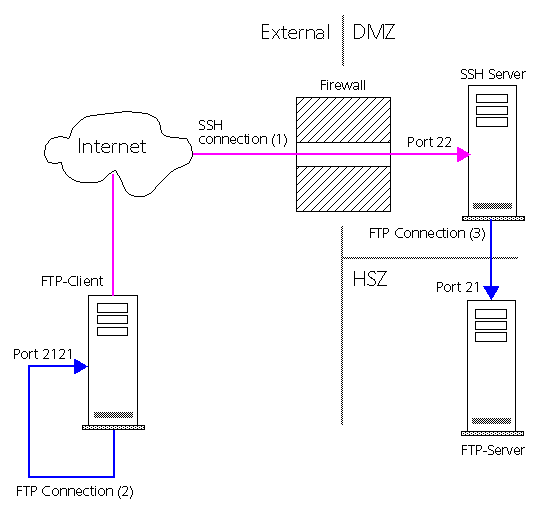
Using SSH (Secure Shell), you have the possibility to tunnel any protocol. A tunnel connects a port of the local machine to a port on a remote machine, via the SSH connection. Tunneling is often called Port Forwarding. Using this technique you may access a FTP-Server behind a firewall in the DMZ (Demilitarized Zone) or even in the HSZ (High Secure Zone). The following prerequisite must be established:
The firewall is open for the SSH Port 22
There is a SSH-Server behind the firewall
The FTP-Server in the DMZ or HSZ must be known by the SSH-Server
You can enable secure connections over the internet using any application protocol, like ftp, telnet, sqlnet, etc. It sounds quite complex, but it is simple. Let's look at an example. The setup is as follows: You have a client that is connected to the internet. The FTP-Server you want to access via ftp is in a corporate LAN (HSZ), behind a firewall. The firewall does only allow the SSH protocol (port 22), you have access to the SSH-server.
This part of the communication is encrypted and appears as SSH communication on the network. The SSH-Server establishes a connection to port 21 on the FTP-Server (3). It decodes the SSH communication and forwards the ftp commands there (Port Forwarding). This part is not encrypted, it appears like normal ftp communication on the network. By physically connecting to port 2121 on your local machine using any ftp client you actually connected logically to port 21 on the remote machine indirectly, but completely transparent !. One such example I already posted earlier. POC not yet done so not able to produce commands used.
Commands Used
In order to authenticate yourself with a key, you will - of course - need to have a key. Generate your key-pair (private and public) using the Create RSA Identity... Two files have been generated. One with the filename you have specified that contains your private key, and one with the same name and the extension .pub that contains the public key.
ssh-keygen
ssh-agent: To enable RSA certificate authentication
ssh-add: To add the private key to authentication agent.
scp : To copy files
ssh –t : To establish ssh session.
Sequence of command used by me
$ ssh-keygen -b 2048 -t rsa
$ eval `ssh-agent –s`
$ ssh-add
$ chmod 0644 ~/.ssh/id_rsa.pub
$ scp –p ~/.ssh/id_rsa.pub max@server1.keekar.com:~/.ssh/authorized_keys
$ ssh-agent –k
You can also Disable PasswordAuthentication - in the OpenSSH configuration file (often /usr/local/etc/sshd_config), find the setting for PasswordAuthentication and change the value to no. This then permits only public key authentication and prevents "regular" passwords from working. We feel strongly that allowing people to guess passwords is a really bad idea, and by insisting on RSA keys, a whole raft of shenanigans can be avoided.
src="http://pagead2.googlesyndication.com/pagead/show_ads.js">